
AI and Copilot studio integration with Dynamics 365 CRM
Copilot for Dynamics 365 provides AI assistance to boost the productivity and efficiency of sales, support, supply chain management, finance, marketing and other teams involved with your business operations. It provides a chat interface for quick summaries of sales opportunities and leads, updates, meeting preparations, account-related news, and much more. Users can seamlessly integrate Copilot with Outlook and Teams for better data management and utilize its generative AI capabilities for record summarization and email content generation.
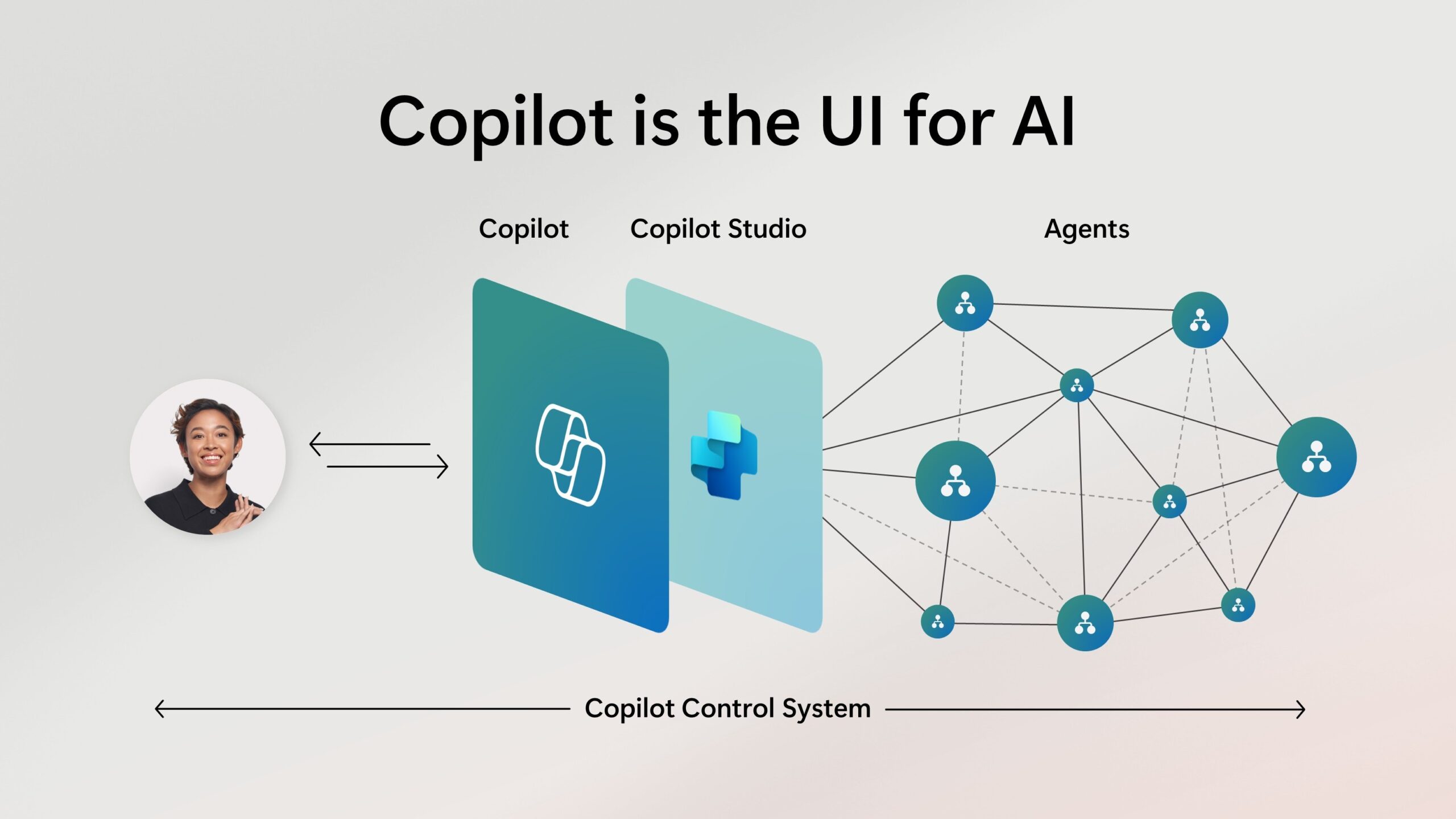
Copilot assists users by automating routine
tasks, such as data entry and
follow-ups, allowing sales and customer service teams to focus on more strategic
activities.
With AI-driven insights, Copilot helps identify customer trends, predict behavior, and
provide personalized
recommendations, enhancing customer engagement and satisfaction.
Additionally, it offers natural language processing features, enabling users to interact with the CRM system more intuitively through voice or text commands.
This integration not only boosts productivity but also empowers businesses to make data-driven decisions and deliver exceptional customer experiences.
Copilot implementation:
Copilot in Dynamics 365 CRM is an AI-powered assistant that enhances the productivity and
efficiency of sales teams. It
leverages natural language understanding to provide quick summaries of opportunities and
leads, catch up on recent
changes to records, prepare for meetings, and even draft emails. With Copilot, sales
professionals can easily access
relevant information, gain insights, and focus on building stronger customer relationships,
ultimately increasing their
chances of closing deals.
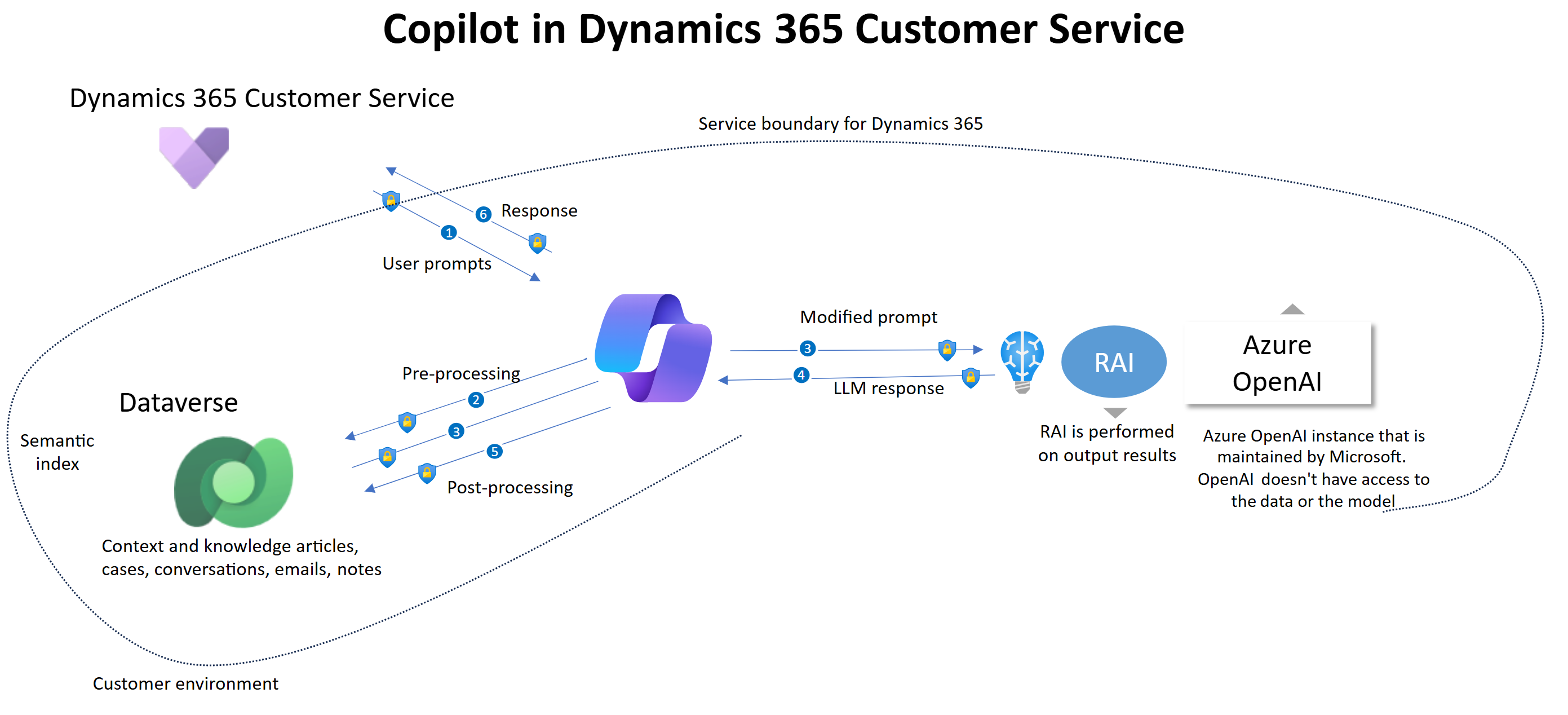
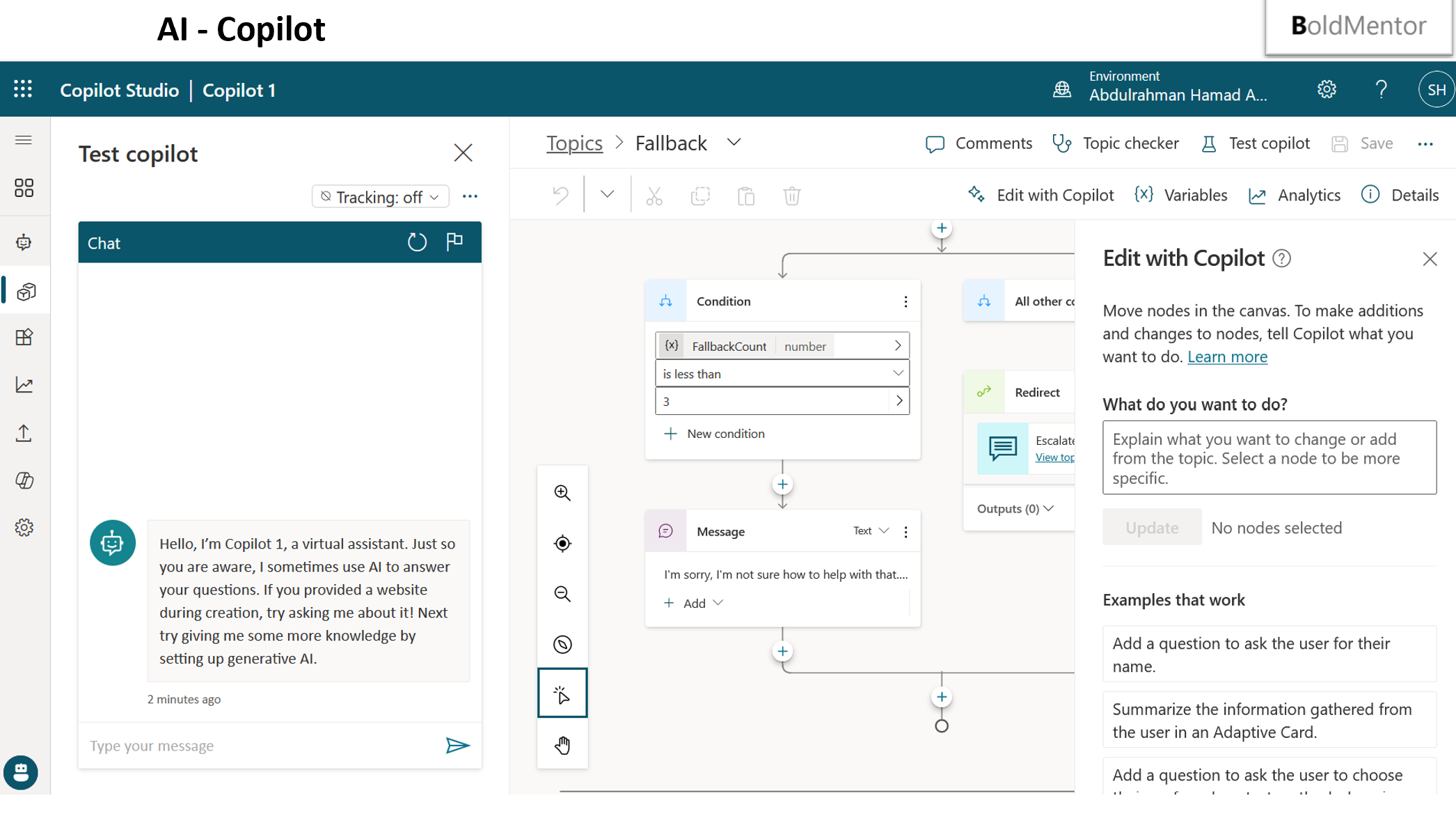
Copilot in Dynamics 365 Customer Service empowers agents to deliver exceptional customer
care. Dynamics 365 Copilot
drafts contextual answers to queries in both chat and email, in addition to providing an
interactive chat experience
over knowledge bases and case history so this AI-powered expertise is always available
to answer questions.
making it easier for customer service departments to build virtual agents in minutes
with conversation boosters in Power
Virtual Agents, which harnesses the power of Azure OpenAI Service and Bing to provide
answers from company websites and
internal knowledge bases that you choose.
Sellers spend much time managing complex customer relationships, and many sales teams
need help to scale seller
experiences. Seller productivity in terms of time management and efficiency is critical
to success. Copilot in Dynamics
365 Sales experiences focus on enhancing seller productivity and effectiveness in their
flow of work by enabling them to
automate the sales process and augment seller actions and decisions with AI-powered
insights and actions.
Copilot
features help sellers save time, boost productivity, lighten workloads, and stay focused
on connecting with customers
and closing deals.
Copilot in Dynamics 365 Customer Service offers the following capabilities:
- Summarize a case and conversation
- Respond to questions
- Compose an email
- Draft a chat response
Microsoft Copilot for Service offers the following capabilities:
- Connect to existing contact center and CRM solutions, with out-of-the-box
integrations
for Dynamics 365, Salesforce,
ServiceNow, and Zendesk
- Quickly bring agents up to speed on email threads within Outlook by providing
summaries,
as well as accelerate responses
to customers by providing draft emails
In Teams, agents can stay on top of meetings with customers or subject matter experts by
viewing AI-powered meeting
- recaps with summaries of key discussion points, sentiment, and next steps
Agents can use Copilot to get the latest account and case information from CRM systems.
BoldMentor Release new version of BoldInspection system
Revolutionizing Safety Inspections with Dynamics 365 CRM and Copilot
In today's fast-paced industrial landscape, ensuring safety is paramount.
Traditional
paper-based inspection systems are
often cumbersome, prone to errors, and lack real-time visibility. By leveraging the power of
Microsoft Dynamics 365 CRM,
coupled with the intelligent assistance of Copilot, organizations can transform their safety
inspection processes into a
streamlined, efficient, and proactive system.
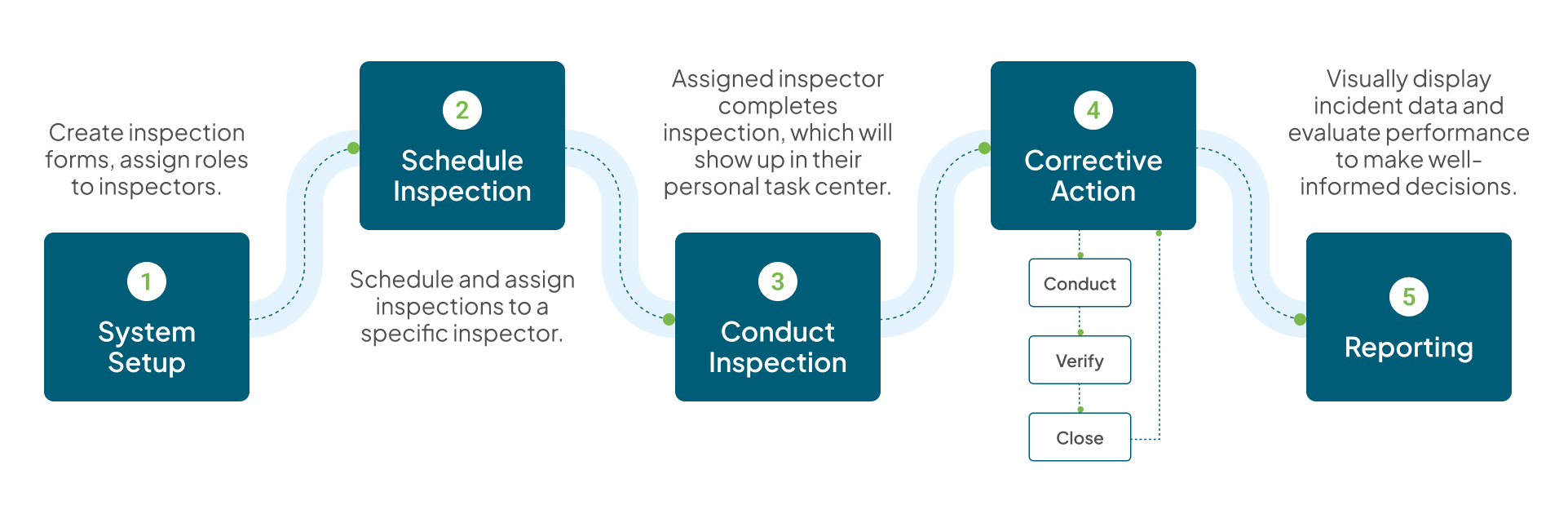
Building a Robust Inspection Framework in Dynamics 365 CRM
At the core of this system lies Dynamics 365 CRM, providing a centralized platform
for managing all aspects of safety
inspections. Here's how it works:
Customizable Inspection Lists
- Create detailed inspection lists tailored to specific equipment, areas, or
regulatory requirements.
- Define clear grading criteria and evaluation parameters, ensuring consistency
across all inspections.
- Implement a hierarchical structure to categorize inspection items, enabling easy
navigation and reporting.
Mobile-First Inspection Experience:
- Empower inspectors with the Dynamics 365 mobile app, allowing them to conduct
inspections on-site, even in remote
locations.
- Capture data in real-time, including photos, videos, and voice recordings,
directly within the app.
- Utilize offline capabilities to ensure uninterrupted inspections in areas with
limited connectivity.
Comprehensive Data Capture:
- Record inspection details, including dates, times, locations, and inspector
information.
- Enable inspectors to add detailed comments and annotations, providing context and
clarity.
- Implement digital signatures for accountability and compliance.
Grading and Evaluation:
- Assign grades or scores to individual inspection items based on predefined
criteria.
- Calculate overall inspection scores and generate reports summarizing findings.
- Visualize inspection data through dashboards and charts, providing insights into
safety trends and areas for
improvement.
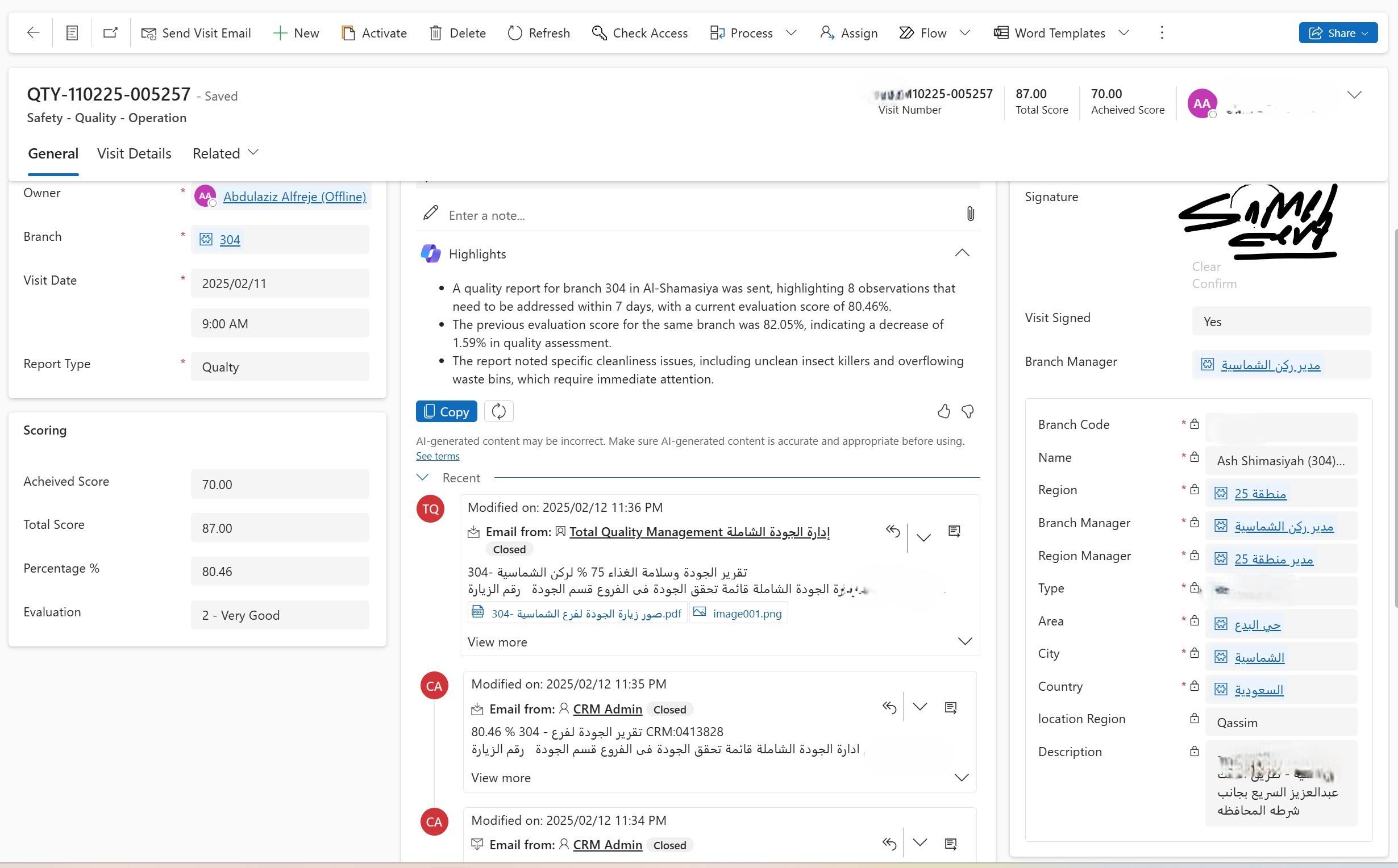
Leveraging Copilot for Enhanced Efficiency and Insights:
Microsoft Copilot elevates the inspection process by providing intelligent assistance
and automation.
AI-Powered Data Entry:
- Use Copilot to transcribe voice recordings into text, streamlining data entry and
reducing manual effort.
- Leverage AI to analyze inspection comments and identify potential safety hazards
or recurring issues.
- Copilot can also help to summarize large amounts of inspection data into smaller
more digestable points.
Proactive Reminders and Notifications:
- Automate email notifications to relevant teams, alerting them to inspection
results and required corrective actions.
- Set up reminders for scheduled inspections and follow-up activities, ensuring
timely completion.
- Copilot can help to create the email body based on the inspection data.
Intelligent Reporting and Analysis:
- Generate customizable reports and dashboards, providing real-time insights into
safety performance.
- Use Copilot to analyze inspection data and identify trends, patterns, and
potential risks.
- Copilot can assist in creating reports, and also help to spot trends that might
have been missed by human eyes.
Corrective Action Management:
- Automatically create tasks and assign them to the appropriate teams based on
inspection findings.
- Track the progress of corrective actions and ensure timely resolution.
- Automate follow up emails to the assigned teams.
Automated Email Workflows for Seamless Communication
Email automation is crucial for ensuring timely communication and action.
- Automated Inspection Reports:
Generate and send automated inspection reports to relevant stakeholders, including
management, safety teams, and
maintenance personnel.
- Corrective Action Notifications:
- Send automated notifications to assigned teams when corrective actions are
required, including details of the issue and
required steps.
Reminder Emails:
Schedule automated reminder emails for upcoming inspections, overdue corrective actions,
and follow-up activities.
Benefits of Implementing a Dynamics 365 and Copilot Safety Inspection System:
- Improved safety compliance and reduced risk of accidents.
- Increased efficiency and productivity of inspection teams.
- Enhanced data accuracy and real-time visibility into safety performance.
- Streamlined communication and collaboration among stakeholders.
- Proactive identification and mitigation of safety hazards.
- Enhanced record keeping for compliance and audit purposes.
- Reduced paper usage and environmental impact.
By adopting a Dynamics 365 CRM and Copilot-powered safety inspection system, organizations can create a safer and more efficient workplace, ensuring the well-being of their employees and the success of their operations.